

Automations
Automations: Set It Once.
It Runs Forever.
Automations:
Set It Once.
It Runs Forever.
Workflows, AI actions, and recall campaigns, all on autopilot.

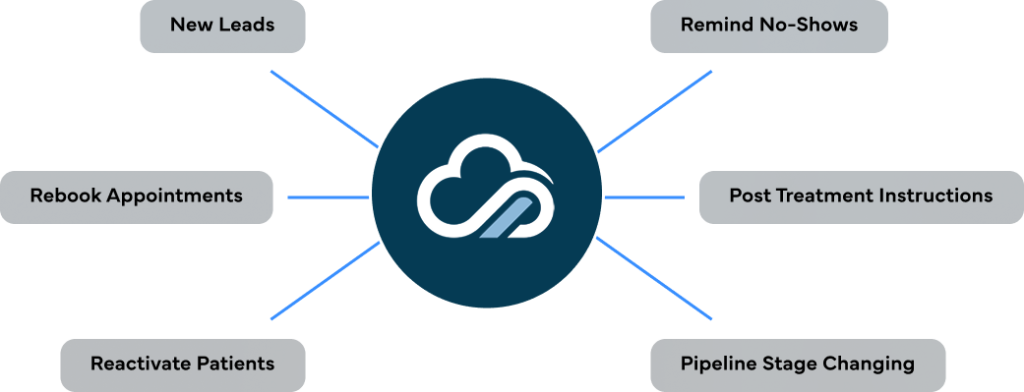

Zero manual
follow-ups
AI-powered
pipeline updates
Recall drips
customized by
treatment
Every automation
logged & trackable
Automate the work your team keeps forgetting.

Workflows
Visual drag-and-drop builder with triggers, actions, conditions, and rules. Build any automation your practice needs no code, no IT.

AI Actions
AI suggests follow-ups, updates pipeline stages, analyzes no-shows and drop-offs, and takes action automatically. Your AI copilot for operations.

Recall
Patient reactivation campaigns with email and text drips. Customizable by treatment, so a treatment patient gets a different recall sequence than another one.
Your team forgets. KloudMD doesn't.
Every missed follow-up is a missed patient. Every late response is a lost lead. KloudMD Automations removes the human error from your practice operations. Build workflows that trigger automatically when something happens, a new lead comes in, an appointment is booked, a patient no-shows, a form is submitted. Let AI handle pipeline updates and suggest next steps. And set up recall campaigns with email and text drips that bring inactive patients back, customized by treatment so the messaging is always relevant.
Workflows
Build it once. It handles the rest.
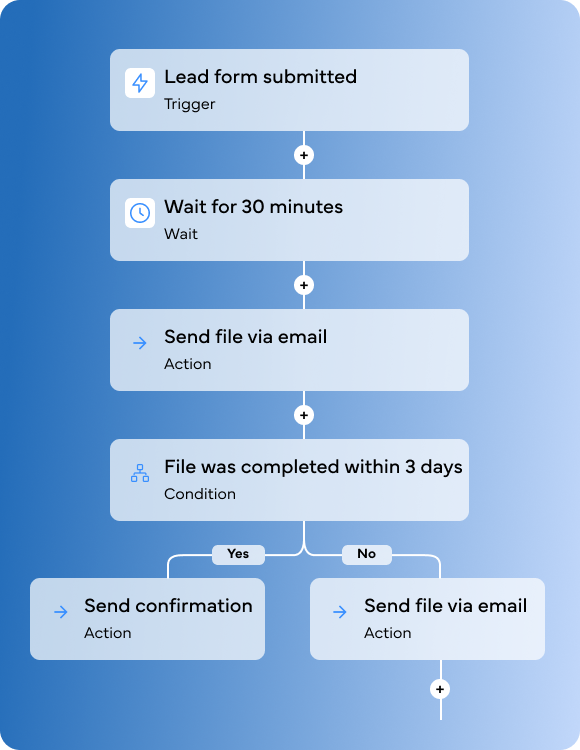
KloudMD Workflows let you automate any repeatable process in your practice without writing code or calling IT. Use the visual builder to set a trigger (something happens), define conditions (if this, then that), and assign actions (send a text, move a pipeline stage, create a task, notify a staff member). Every workflow runs automatically and logs every action so you can see exactly what happened and when.
Triggers
Start a workflow when something happens: new lead created, form submitted, appointment booked, appointment cancelled, no-show detected, pipeline stage changed, payment received, or any custom event.
Actions
Books directly into your EMR, not a lead form, a real appointment. Checks live provider availability, matches patients to the right provider by specialty, and location.
- Real-time EMR booking (DrChrono, Athena, ModMed, Zenoti + more)
- Provider matching by specialty, schedule, and insurance
Conditions & Rules
Books directly into your EMR, not a lead form, a real appointment. Checks live provider availability, matches patients to the right provider by specialty, and location.
- Real-time EMR booking (DrChrono, Athena, ModMed, Zenoti + more)
- Provider matching by specialty, schedule, and insurance
Multi-Step Sequences
Books directly into your EMR, not a lead form, a real appointment. Checks live provider availability, matches patients to the right provider by specialty, and location.
- Real-time EMR booking (DrChrono, Athena, ModMed, Zenoti + more)
- Provider matching by specialty, schedule, and insurance
Workflow Logs
Books directly into your EMR, not a lead form, a real appointment. Checks live provider availability, matches patients to the right provider by specialty, and location.
- Real-time EMR booking (DrChrono, Athena, ModMed, Zenoti + more)
- Provider matching by specialty, schedule, and insurance
Templates
Books directly into your EMR, not a lead form, a real appointment. Checks live provider availability, matches patients to the right provider by specialty, and location.
- Real-time EMR booking (DrChrono, Athena, ModMed, Zenoti + more)
- Provider matching by specialty, schedule, and insurance
AI ACTIONS
AI doesn't just analyze, it acts.
Most platforms give you data and leave the follow-up to your team. KloudMD AI takes action. It suggests follow-ups based on patient behavior, updates pipeline stages automatically when something changes, analyzes no-show patterns, and flags drop-offs before they become lost patients. Your team gets prompted with the right action at the right time, or AI handles it entirely.
Suggested Follow-Ups
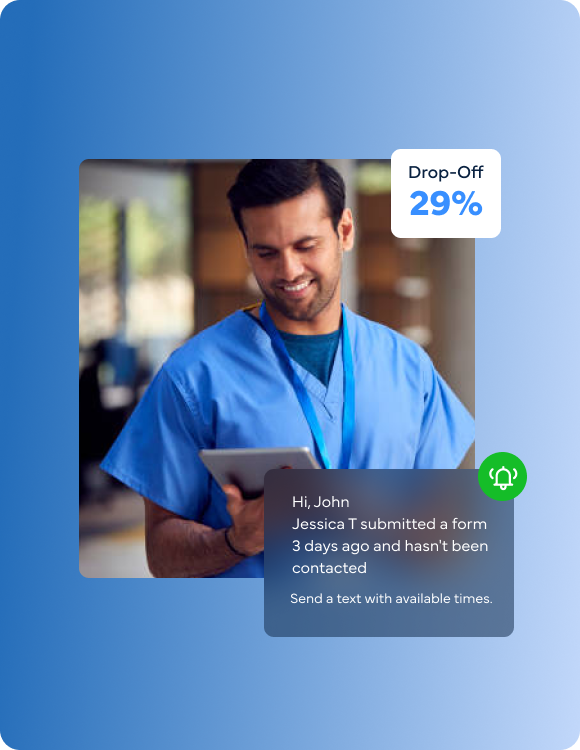
AI monitors your pipeline and surfaces follow-up recommendations. "Jessica T submitted a form 3 days ago and hasn't been contacted, suggest: send a text with available times." Your team sees the suggestion and acts with one click, or set it to auto-send.
Auto Pipeline Updates
Get Figma’s font installer or desktop app to use fonts from your computer.
No-Show Analysis
Get Figma’s font installer or desktop app to use fonts from your computer.
Drop-Off Detection
Get Figma’s font installer or desktop app to use fonts from your computer.
Smart Escalation
Get Figma’s font installer or desktop app to use fonts from your computer.
Action Logging
Get Figma’s font installer or desktop app to use fonts from your computer.
RECALL
Bring patients back, automatically, by treatment.
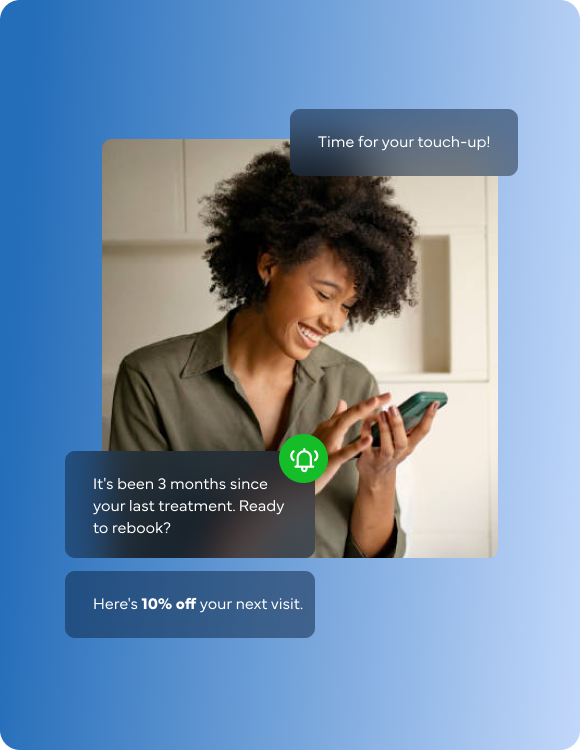
The most profitable patients are the ones you already have. KloudMD Recall automates patient reactivation with email and text drip campaigns customized by treatment. A patient gets a recall sequence at 3 months ("Time for your touch-up!"). A patient gets one at 6 months.. Every drip is tailored to the treatment they received, so the message feels personal not like a mass blast. Set it once, and patients keep coming back.
Email Drip Campaigns
Multi-step email sequences that go out automatically based on the patient's last treatment date. Educate, remind, and offer — all on autopilot. "It's been 3 months since your last treatment. Ready to rebook? Here's 10% off your next visit."
Text Drip Campaigns
Get Figma’s font installer or desktop app to use fonts from your computer.
Custom by Treatment
Get Figma’s font installer or desktop app to use fonts from your computer.
Patient Reactivation
Get Figma’s font installer or desktop app to use fonts from your computer.
Automated Scheduling
Get Figma’s font installer or desktop app to use fonts from your computer.
Performance Tracking
Get Figma’s font installer or desktop app to use fonts from your computer.
Opt-Out Compliance
Get Figma’s font installer or desktop app to use fonts from your computer.
Automations that know your
patients, not just your rules.
Workflow builder
AI actions
No-show recovery
Recall campaigns
Patient context
Logging
Compliance
Zapier / Mailchimp /
Manual Follow-Up
-
External tool (Zapier), limited triggers,
extra cost
-
No AI, everything is manual or
rule-based
-
Manual: staff notices, staff calls
(maybe)
-
Generic email blasts, same
message to everyone
-
Automations disconnected from
patient records
- No visibility into what ran or didn't
- Manual opt-out tracking
KloudMD Automations
- Built-in visual builder — triggers, conditions, actions, all connected to your patient data
- AI suggests follow-ups, updates pipeline, detects drop-offs, and acts automatically
- AI detects no-shows instantly and triggers recovery workflows
- Email and text drips customized by treatment type: treatment X gets a different sequence than Y
- Every automation has full patient context: profile, history, pipeline stage, treatment
- Full logs on every automation: what happened, when, for whom
- Built-in TCPA and CAN-SPAM compliance
Automations powered by your EMR data
KloudMD pulls appointment and treatment data from your EMR to trigger the right automations at the right time. Patient completed a Botox treatment? The 90-day recall drip starts automatically. No manual tagging. No separate tracking.









See if your Electronic Medical Record (EMR)
Integrates with our System (CRM)
Every appointment — whether booked online, by AI, or by your staff — syncs to your EMR in real time. No double-entry. No mismatched calendars. One booking, everywhere.
Your practice, running itself.
Workflows that trigger automatically. AI that follows up and updates your pipeline. Recall drips that bring patients back by treatment. Set it once — KloudMD handles the rest.
-
Zero manual follow-
ups — workflows
handle it automatically
-
AI detects no-shows
and drop-offs before
your team does
-
Every automation
logged with full audit
trail
-
Built-in compliance
— TCPA and CAN-
SPAM